Practical steps for moving forward with computational access
Taking the first steps to implement or work with a new technique or technology can be a challenge, particularly when you do not know how, or even where, to start. This section offers practical tips to help digital preservation practitioners move forward, as well as case studies demonstrating how others have tackled the challenge.
Circumstances will vary widely in terms of the resources and technical skills available to an organization as well as in the type of material they are hoping to provide access to. However, the following ideas should provide a useful starting point for further exploration, whatever your circumstances. These '23 things' focus on actions aimed at both individual practitioners and at organizations, though of course there will be some overlap and you are encouraged to consider all points.
Steps for an individual practitioner
-
Do something! It is easy to be overwhelmed by the possibilities available, but the best way to learn is to experiment. For example, if you can safely do so, consider making a small dataset available and seeing how people use it.
-
There are great free resources available to learn more about computational techniques – use these to build your capacity. Good places to start are the Programming Historian or Library Carpentry. There are links to more resources at the end of this guide.
-
Talk to people you do not normally talk to. A computational access project will benefit from a multi-disciplinary approach, and the more people with different perspectives you can talk to about it, the better. This could include people within your organization or in the wider community.
-
Scope out your project meaningfully. While it might be tempting to just say ‘I want all the data’, that would not work in an 'analogue' project and will not work in a digital one either.
-
Check the licences and terms of access that apply to the material you are working on, collate these in a document so you know, and can share, what users can legally do with your content.
-
Look for existing datasets you can use to enrich the data you will be working with. For example, you might work in an organization that has catalogue entries you could incorporate into your project as metadata.
-
Familiarize yourself with the various approaches to computational access discussed in this guide. They might all be useful to different types of user, but there are implications for the skills and resources you need for your project.
-
Computational approaches and their outputs can lend work an aura of ‘objectivity’ that should be treated with caution. Keep in mind that your outputs might look more authoritative than perhaps they should, so think about how you can explain and qualify them. Make your assumptions and processes transparent to the user if you can.
Steps for an organization
-
Consider how computational access may align with, or support, organizational strategy. Being able to demonstrate a link may help you to make the case to explore new methods of access and gain the support of colleagues.
-
Apply an active outreach approach. Speak to your users, set up user groups, conduct interviews. Try to help them articulate what they want (or might want if they knew about it) from computational access.
-
Consider your own colleagues as a user community for computational access. While you might aspire to attract a new group of external users, computational access can also be of great benefit internally, by, for example, increasing your own understanding of your collections.
-
A good way to generate ideas is to create a single dataset in a familiar format such as CSV, and host an internal hackathon, giving staff time to play with the dataset and see what they come up with.
-
Think carefully about where the expertise to guide service provision for computational access lies in your organization, and how you can engage the right people. Bear in mind that expertise and responsibility might not always go together.
-
Consider sustainability from the start. Remember that users may come to depend on the services you are planning to deliver, and you have a responsibility to think about how you will sustain them. Consider the resource commitment you will need and the environmental impact of your project. Though not specifically focusing on computational access, the article Towards Environmentally Sustainable Digital Preservation discusses the need for a paradigm shift in archival practice and touches on the environmental impact of mass digitization and instant access to digital content.
-
Make documentation an integral part of your project from the very beginning. Part of the appeal of computational access is that others can build on your work in new and unexpected ways. A well-documented service, ideally with worked examples, will help facilitate this.
-
Consider funding or empowering other users to approach your collections in new computational ways. For example, you could run a content hacking competition or workshop for postgraduate students and/or community practitioners to imagine potential uses of your content.
-
Find a public domain or CC0 ‘No Rights Reserved’ collection, dataset or set of metadata and publicly release it. This can serve as a trial run to work through your processes, and as a way of engaging with users and working out what to do next.
-
Search for existing standards you can use. Do not reinvent the wheel if other organizations have done already done similar work. For example, if you adopt similar data output forms to other organizations, it will make it easier for users who are already familiar with the standard.
-
Ask lots of awkward questions during the procurement of any system. This might feel uncomfortable but will save problems in the long run. Engage expert colleagues to help you with this if needed.
-
When testing your system, and when you are in production, be sure to question your results – are you able to identify and describe bias in the results? Do not take the computer's answer as right! The following article is an interesting reflection on selection and technological bias of the Living with Machines project: Living with Machines: Exploring bias in the British Newspaper Archive.
-
It is important that users can contact you with questions or to request further data from your collection, so provide a primary contact or a contact form as part of your project.
-
Make sure you have a defined plan to transition discussions of ethics to concrete actions in systems, processes, and collaborations.
-
Going forward, embed computational access in your day-to-day collection accessioning and processing. New methods of access may require adjustments to organizational policy, accessioning and appraisal workflows and conversations or agreements with donors and depositors. The Reconfiguration of the Archive as Data to Be Mined is a helpful article which discusses changing practices brought about by the move to online digital records.
Further practical tips for getting started can be found in '50 things' which has been published as part of the Collections as Data framework and inspired this section of the guide. Though 50 things is not aimed specifically at digital preservation practitioners many of the tips and ideas are helpful and their key message "start simple and engage others in the process" is great advice!
Further Resources and case studies
This section highlights some useful resources recommended by our expert workshop participants.
Case studies
The case studies listed in this section provide helpful examples of how computational access techniques have been applied in practice.
-
Discovering topics and trends in the UK Government Web Archive by the Data Study Group at the Alan Turing Institute – ‘A detailed case study demonstrating a series of experiments to unlock the UK Government Web Archive for research and experimentation by approaching it as a dataset.’ Jenny Mitcham, Digital Preservation Coalition
-
Providing computational access to the Polytechnic Magazine (1879 to 1960) by Jacob Bickford – ‘A practical and accessible case study describing a project at the University of Westminster which used NLP to provide computational access to a collection of digitized material. It includes links to useful resources that helped with getting started, and the code developed is also shared so that others can make use of it.’ Jenny Mitcham, Digital Preservation Coalition
-
Datathon slides highlighting possibilities with the material by the Archives Unleashed Project – ‘A collection of slides from datathons run as part of the Archives Unleashed project, these highlight a number of computational methods that could be applied.’ Leontien Talboom, University College London
-
Using AI for digital selection in government by The National Archives (UK) – ‘Outputs from an experiment which tested and evaluated a series of tools to undertake automated classification of a dataset to predict retention labels.’ Jenny Bunn, The National Archives (UK)
-
Reflecting On a Year of Selected Datasets by Predo Gonzalez-Fernandez – ‘A useful write up of how datasets have been made available at the Library of Congress.’ Jacob Bickford, The National Archives (UK)
-
Exploring National Library of Scotland datasets with Jupyter Notebooks by Sarah Ames and Lucy Havens – ‘An interesting example using Jupyter Notebooks to explore National Library of Scotland collections in a different way.’ Leontien Talboom, University College London
-
Web Data Research blogs by the Internet Archive – ‘Multiple examples of types of use and various tools, platforms, and partnerships.’ Jefferson Bailey, Internet Archive
-
Machine Learning with Archive Collections by Jane Stevenson – ‘This blog post shows the possibilities and potential of machine learning when applying it to archival collections.’ Leontien Talboom, University College London
The case studies below were shared as part of a series of events to promote the launch of this guide and represent a range of different approaches to computational access.
Jacob Bickford, The National Archives UK - ‘DIY’ Computational Access: the Polytechnic Magazine (1879 to 1960)
Sarah Ames, National Library of Scotland - Collections as data at the National Library of Scotland: access, engagement, outcomes
Ian Milligan, University of Waterloo - Providing Computational Access to Web Archives: The Archives Unleashed Project
Ryan Dubnicek and Glen Layne-Worthey, HathiTrust Research Center, University of Illinois Urbana-Champaign - How to Read Millions of Books: The HathiTrust Digital Library and Research Center
Jefferson Bailey, Internet Archive - Tales from the Trenches: Building Petabyte-scale Computational Research Services
Tim Sherratt, University of Canberra - Living archaeologies of online collections
Examples of approaches and infrastructures
The list below provides some helpful examples for you to explore, showing how different organizations have opened up their collections for computational access using a variety of techniques:
-
SHINE – ‘This is a prototype search engine for UK Web Archive with trend analysis. It is a good example of what is possible but is also very user friendly – a great way of introducing people to looking at a digital resource in a different way.’ Jacob Bickford, The National Archives (UK)
-
GLAM Workbench – ‘A set of Jupyter notebooks, demonstrating different computational techniques. This is great for its broad range of subject matter and exposing the underlying code.’ Jacob Bickford, The National Archives (UK)
-
SolrWayback – ‘Search tools for web archives, again a great demonstration of what is possible.’ Jacob Bickford, The National Archives (UK)
-
DigHumLab – ‘A digital ecosystem that highlights a number of collections open for computational access, also includes some inspirational examples of how researchers have used these collections.’ Leontien Talboom, University College London
-
Data Foundry – ‘This is a good example of access to National Library of Scotland data collections.’ Jane Winters, University of London
-
Web Archive Datasets – ‘Datasets made available by the Library of Congress Labs including Jupyter notebooks on working with the meme collection.’ Jacob Bickford, The National Archives (UK)
-
The Cybernetics Thought Collective – ‘A digitization project that also provides a web portal and analysis engine and highlights the potential of computational methods for this type of material.’ Leontien Talboom, University College London
-
BigLAM (Libraries, Archives and Museums) - ‘This collaboration showcases how there is an interest in GLAM material in the form of data. The provided datasets also highlight what attributes may be of importance to people wanting to use this material for different computational methods.’ Leontien Talboom, University College London
Further reading
This guide has provided an introduction to computational access for beginners but of course there is no shortage of further reading on the topic. The following articles, papers and blogs have been recommended by the contributors to this guide and can be used to explore the topic in more depth:
-
The Web as History by Niels Brügger and Ralph Schroeder – ‘Highlights a number of examples that could be used to explore web archives, also discusses the broader constraints and benefits of using this type of material.’ Leontien Talboom, University College London
-
Lessons from Archives: Strategies for Collecting Sociocultural Data in Machine Learning by Eun Seo Jo and Tinnit Gebru – ‘A nice example of cross-domain exploration of what archival science/practice can offer to machine learning development – it is rare to see the relationship framed this way.’ Thomas Padilla, Center for Research Libraries
-
From archive to analysis: accessing web archives at scale through a cloud-based interface by Nick Ruest, Samantha Fritz, Ryan Deschamps al. – ‘This paper looks at how first-hand research and analysis of how researchers actually use web archives has led to the development of the Archives Unleashed Cloud – an online interface for working with web archives at scale.’ Ian Milligan, University of Waterloo
-
Responsible Operations: Data Science, Machine Learning, and AI in Libraries by Thomas Padilla – ‘This report discusses the technical, organizational, and social challenges that need to be addressed in order to embed data science, machine learning, and artificial intelligence into libraries. The recommendations within it align closely with community aspirations toward equity and ethics.’ Jenny Mitcham, Digital Preservation Coalition
-
Ensuring Scholarly Access to Government Archives and Records by William Ingram and Sylvester Johnson - "This project provides a number of examples and recommendations when applying machine learning methods for the automatic creation of metadata. This may not be the main focus of this guide, but it does give some interesting concepts and ideas around applying these methods at scale." Leontien Talboom, University College London
How this guide was created
This guide to computational access was created collaboratively by Leontien Talboom (who received support from the Software Sustainability Institute to carry out this work, the Digital Preservation Coalition, and invited experts from across the community.
The development of this guide was informed by an initial expert workshop held online in February 2022. Invited experts were encouraged to share their thoughts on the definitions of key terms related to computational access and answer questions such as ‘what are the strengths, risks, opportunities, and barriers of computational access for digital archives?’, ‘what practical steps can practitioners take to move forward?’ and ‘what are the key resources people should access in order to find out more?’. The discussion was conducted across time zones and fuelled by cookies and cake. This workshop helped firm up the key elements that would be needed within the guide, and engagement with this group of experts continued as the resource was developed.
Also key to the evolution of this guide was an online launch event held on 6 July 2022. Lowering the Barriers to Computational Access for Digital Archivists : a launch event was intended not only to share this work with the community for the first time, but also to gather a range of helpful case studies that could be made available to further illustrate the online guide.
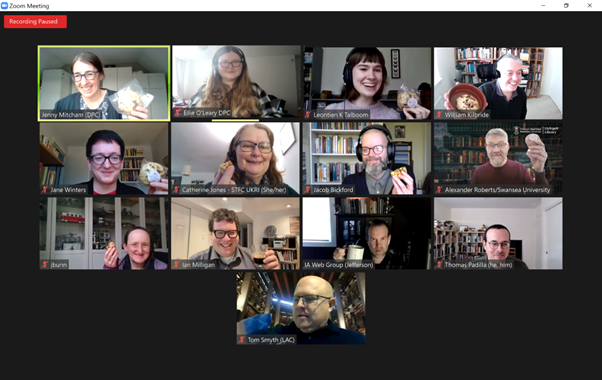
Attendees at the expert workshop on computational access held online in February 2022.
This guide was written by Leontien Talboom with contributions from Jacob Bickford, Jenny Bunn and Jenny Mitcham.
Our thanks go to the experts who contributed to the workshop and provided helpful comments on earlier drafts of this text:
-
Jefferson Bailey, Internet Archive
-
Jacob Bickford, The National Archives (UK)
-
Jenny Bunn, The National Archives (UK)
-
Catherine Jones, STFC
-
William Kilbride, Digital Preservation Coalition
-
Ian Milligan, University of Waterloo
-
Thomas Padilla, Center for Research Libraries
-
Alexander Roberts, University of Swansea
-
Tom J. Smyth, Library and Archives Canada
-
Jane Winters, University of London
Thanks also go to those who provided case studies on this topic at our online launch event:
-
Sarah Ames, National Library of Scotland
-
Jefferson Bailey, Internet Archive
-
Jacob Bickford, The National Archives (UK)
-
Ryan Dubnicek, HathiTrust Research Center, University of Illinois Urbana-Champaign
-
Glen Layne-Worthey, HathiTrust Research Center, University of Illinois Urbana-Champaign
-
Ian Milligan, University of Waterloo
-
Tim Sherratt, University of Canberra
 |
Elements of this work were funded by the Software Sustainability Institute. |
Approaches to computational access - Terms of use
Terms of use
All openly available data and collections should come with terms of use, as it is possible for open data to be harvested and computed over by users, even if it was not intentionally made available for computational access. The terms of use are a guide for users who wish to collect and compute over the material made available. As Krotov and Silva argue, if no terms of use are available, the scraping of sensitive or copyrighted material is left to the discretion of the user.
Here are some examples of terms of use:
-
The National Archives (UK)– this document also addresses web crawlers and bulk downloads.
-
The University of Edinburgh – information on copyright and e-resources that explicitly includes data miningand text mining.
Approaches to computational access - Bulk dataset/Downloads
Bulk dataset/Downloads
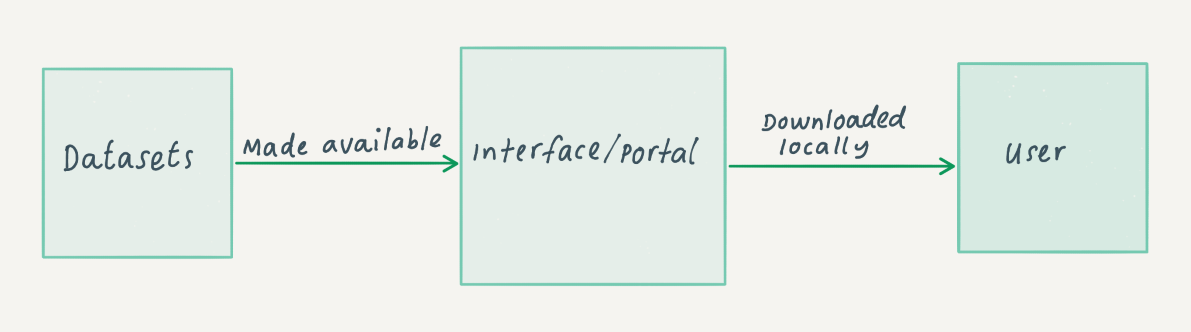
This type of computational access is where an organization makes its material available through a data download. The organization creates a dataset from its material (this may be all of its collections, or a sub section of them), processes it and then makes it possible for users to download it through an online interface or portal. These datasets are normally available in CSV (Comma Separated Values) and JSON formats, as they are ubiquitous and easy to read by both humans and computers. Read more about the CSV and JSON formats here: Our Friends CSV and JSON.
This type of access gives an organization a lot of control over the material, as it sets the parameters of what is being made available. However, this approach also requires a lot of maintenance, as the dataset will need to be updated and uploaded manually. Versioning is also something to take into consideration. For single files or downloads this may not be as problematic, but when working with large amounts of data this can be important, as results may differ from version to version, depending on what has changed and why. Even if providers cannot retain all versions of the data, users should be encouraged to correctly cite the version they have used to aid in potential reproducibility.
Once the users download the file, they will have to set up their own environment and decide what they want to do with this material. Archivists may see this as the easiest way to make data computationally accessible as it fits well with existing concepts of access and use. They are used to packaging and storing information for users to request and access and the bulk datasets approach could be seen as a very similar process.
The diagram below illustrates the simplicity of the bulk datasets approach. An organization makes a dataset available through an interface or portal. A user can then download this dataset to work with.
There are different ways of providing access through bulk datasets. The type of material made available as datasets may differ; some organizations will only make their metadata available in bulk, whereas others include both the data and metadata. The hosting of the datasets does not necessarily have to be done by the organization itself. It may decide to upload this material to a third-party provider. For example, large datasets from the Museum of Modern Art (MoMA) in New York are hosted through GitHub; these files are automatically updated monthly and include a time-stamp for each dataset.
A similar approach is taken by Pittsburgh’s Carnegie Museum of Art (CMoA) which also has a GitHub repository; however, this one is updated less regularly.
OPenn is another repository for datasets, specifically archival images. It is managed by a cultural heritage institution which provides access to its own material as well as material from contributing institutions.
A slightly different approach was taken by the International Institute of Social History (IISH) in the Netherlands, which uses open-source software to make its datasets accessible. A slightly modified version of Dataverse is hosted on their website.
The table below showcases a variety of ways in which the bulk dataset model has been applied at different organizations including the following:
-
Are data or metadata (or both) are made available?
-
Is data updated and versioned?
-
Which file formats are available?
-
Where is it hosted?
|
Organization/Project |
Data/Metadata |
Versioning |
Updated |
Terms of use |
Downloadable format |
Type of Data |
Hosted on |
|
Both |
Yes |
Yes |
Yes |
Available through rsync |
Unstructured book files |
Own website |
|
|
Metadata |
Yes |
Yes |
Yes |
Several formats through GitHub |
Metadata of collection |
GitHub |
|
|
Both |
Yes |
Yes |
Yes |
Depends on the dataset |
Structured research datasets |
Own website with use of Dataverse |
|
|
Both |
No |
No |
Yes |
CSV and JSON |
Object from museum |
GitHub |
|
|
Both |
No |
Yes |
Yes |
CSV, TIFF and TEI |
High Resolution archival images |
Own website |
Approaches to computational access - Application Programming Interface (API)
Application Programming Interface (API)
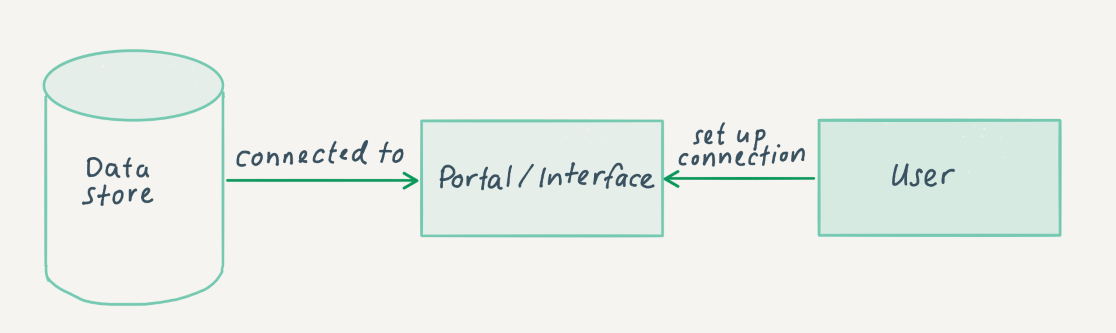
Another computational access approach is the use of an Application Programming Interface (API). With this, it is possible for users to send a list of instructions within certain parameters to a data store, usually a server and a database maintained by the content provider. This list of instructions is then processed, and data is returned to the user. Further information about what an API is and how they can be used can be found here: What Is an API, and How Do Developers Use Them?. The following example from The National Archives (UK) shows how it provided an API to enable users to analyze its archival catalogue data.
Using an API is a more fluid way to access data than the bulk datasets approach, as the user can be more specific on the material that they want; it also requires less bandwidth and disk space. This is a more computational approach than the bulk datasets approach, as processing the data and updating it does not have to be done manually by the content provider – the API provides direct access to the data.
The data made available by organizations may differ; some will only opt to make their metadata available, see The National Archives (UK) Discovery API, whereas other organizations, such as The Wellcome Collection, offer access to their actual data. Documentation is mainly directed at developers wanting to use these tools. However, The National Archives (UK) offers a Sandbox mode, accompanied by a blog including examples, to make it more accessible to people with fewer computational skills.
The diagram below provides a simple illustration of how the API approach works. Data is stored in the data store (normally as a database), and the user can connect to this data store via a portal or interface.
Just as with the bulk dataset approach, the API does not necessarily have to be hosted by the organization itself. Europeana offers a portal for different cultural heritage organizations and Systems Interoperability and Collaborative Development for Web Archiving (WASAPI) offers a similar idea for archived web material. APIs can have different architectural implementations. One of the most popular (also regarded as best practice) is the Representational State Transfer (REST) API. This architectural style follows a number of guidelines and has resulted in an API that is lightweight, fast and simpler by design. Find out more about REST APIs and how to use them here: Understanding And Using REST APIs.
Much of the documentation around APIs in cultural heritage institutions is unclear on their implementation; however, the WASAPI is very clear on how it has implemented and used a REST API approach and this is fully documented on GitHub. Some organizations have made a different architectural choice by including the API as an add-on to their already existing infrastructure; an example of this is the Discovery API at The National Archives (UK).
The table below lists examples of different types of APIs and describes some of the variations in their implementation, for example:
-
Does the API offer metadata or data (or both)?
-
What type of data is being offered? Is this structured or unstructured?
-
Do users have to register in order to access the API? This is a common feature of an API that may differ from other approaches (such as the bulk datasets approach). Registration to an API gives the organization an idea of who is requesting data.
|
Organization/Project |
Data/Metadata |
Type of Data |
Type of API |
Documentation |
Registration |
|
Metadata |
Structured |
As an add-on to the original infrastructure |
Yes, and includes a Sandbox mode |
The National Archives needs to be contacted and IP address should be provided |
|
|
Data |
Unstructured |
Rest API |
Yes |
N/A |
|
|
Two separate for metadata and data |
Structured |
Rest API |
Yes, but limited to developers |
No registration necessary |
|
|
Search API – for metadata and data |
Structured |
Rest API |
Yes, with multiple guides |
Registration is necessary, a new API key is needed for every implementation |
Approaches to computational access - Platform
Platform
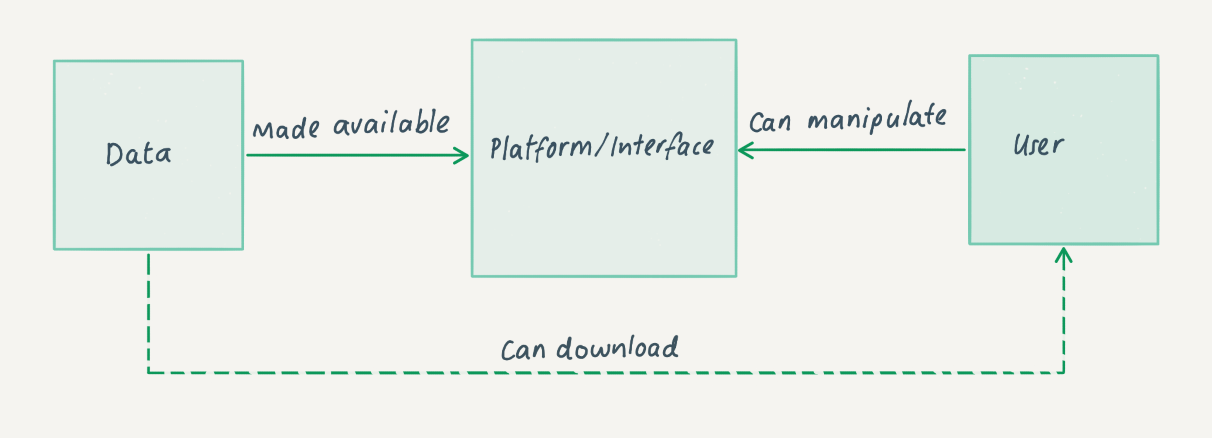
The final approach described in this guide is the provision of computational access to collections through a platform or interface made available by the content-providing organization. This is normally a dedicated online environment where the user is able to manipulate the material within it. The infrastructure behind this approach can be quite similar to the other two, the main difference being that not only does the user have access to the data, but also access to a set of tools to compute over the data. These platforms range from very simple manipulations, such as Google Books, where date ranges can be changed, to more sophisticated setups such as tools provided in the CLARIAH media suite, which give the user the possibility to explore audio-visual material and the Archives Unleashed project which is focused on analyzing web material.
The control around these environments can vary; some make it possible for everyone to log in, sometimes you need to be a registered user. Also, it may be possible to manipulate material in the environment, but not necessarily output any results, due to copyright or other legislative reasons.
The diagram below illustrates the platform model for computational access and shows the organization making data available through a platform or interface within which the user can access and manipulate the data. The dotted line illustrates the fact that some implementations additionally offer the user the option to download the raw or manipulated data.
Users may even get the opportunity to bring in other datasets or software to work with the data on the platform, but again this may be restricted because of constraints around the material. The Archives Unleashed project is completely different in that aspect, as it only offers the tools with public domain material. This makes it possible for users to bring in their own material. However, as the project is not liable for any of the material brought into its platform, users will not be able to save any of the analyses they have carried out. An interesting paper about the Archives Unleashed project is available here: The Archives Unleashed Project: Technology, Process, and Community to Improve Scholarly Access to Web Archives.
The table below gives an overview of a number of these platforms and notes some of the implementation differences, for example:
-
Does the platform offer metadata or data (or both)?
-
Can users supply their own tools and/or data to work with in the platform?
-
Can data be downloaded from the platform after analysis?
-
What constraints or restrictions are associated with the data?
-
Who can access the platform?
|
Organization/Project |
Data/Metadata |
Bring your own software/datasets |
Downloadable? |
Constraints on Data |
Who can access? |
|
Both |
Yes |
After being checked by staff |
Copyrighted material |
Only accessible by members |
|
|
Both |
Not at the moment |
No, but derived datasets may be possible in future |
Copyrighted material |
Accessible to the public, but need to be logged in to access the full functionality |
|
|
Some public domain material as an example |
Yes, only your own material is accepted |
Yes |
Depends on user, but Archives Unleashed is not liable |
Currently only accessible to Archive-It account holders and researchers who have worked with Archives Unleashed before |
RAM FAQ for DPC Members
On this page we provide answers to the questions that DPC Members have asked us about using DPC RAM. If you have any other questions you think we should add to this list, please let us know.
What support can I get for completing a RAM self-assessment?
All DPC members are eligible for advice and support on their annual RAM assessment from the DPC. We can talk through your assessment with you, discuss your target levels and answer any questions you might have. Do contact us if you would like to arrange some immediate support, or join one of our member-only RAM events (e.g. RAM Jam or RAM-bulance surgery sessions).
When should I complete and share a RAM assessment?
The DPC encourages Members to complete and share a RAM assessment on an annual basis. You will receive communications about this in April each year so that the DPC can collate assessments in early June. If you would prefer to carry out an annual RAM assessment to your own internal timetable that is absolutely fine too. Do feel free to use RAM whenever suits you and share it with us at any time of year - we will always be happy to hear from you.
How do I share a RAM assessment with the DPC?
We would like to make the process of sharing your assessment with us as simple as possible. Simply email Jenny Mitcham (jenny.mitcham@dpconline.org) a copy of your RAM worksheet and we will take it from there.
Is it worth sharing our RAM results if nothing has changed?
Yes, please do let us know if nothing has changed when you carry out your RAM assessment. This is still useful information for us and we can roll over your results from last year to include in our analysis.
What are the benefits of carrying out a RAM assessment every year?
Like any maturity model or assessment framework, DPC RAM will have most impact if carried out on a regular basis to check in on progress, refine goals and inform forward plans. Even if targets set within RAM focus on a longer time period, checking in on where you are every year can be helpful and shouldn’t be too onerous a task to complete.
What are the benefits of sharing our RAM assessment with the DPC?
Sharing your RAM assessment with the DPC has benefits both for your organization and for the DPC community as a whole.
-
For you: If DPC staff have access to your RAM assessment it will enable better and more appropriate support to be provided when you contact us for advice and support - it gives us a quick and easy way to understand your current digital preservation capabilities and a good overview of the challenges you are facing.
-
For the DPC community: Combining the RAM assessments of all members provides useful summary statistics which can be used not only for benchmarking by the community but for tailoring DPC activities going forward to target those areas where more support is needed.
How will the DPC use our RAM assessment?
The DPC will be able to use your RAM self-assessment to better understand your organization and its digital preservation practices, along with your current challenges and areas where support might be most needed. We can use this baseline of information to inform our interactions with you and provide better advice and support. Each year we also collate RAM information that is shared with us to get a broad understanding of where the membership sits as a whole. This information is used on an annual basis to inform our work planning and build our prospectus for the year ahead.
What benchmarking information can I have access to?
Summary information from RAM self-assessments can be found on the benchmarking with RAM page. Note that as access to this information is a member benefit and you will need to log into the DPC website in order to view the page.. Please do not share this information outside of the DPC membership.
DPC Members are also entitled to request more specific benchmarking information if they would like to do so. Perhaps you are interested in benchmarking against summary data that is specific to a particular geographic location (for example the UK) or sector (for example higher education). Do contact us with your requirements and we will see if we can help. Note that our ability to service requests such as these is dependent on the availability of an adequate dataset and is typically only available to those members who have submitted information themselves. In order to protect the identity of specific organizations we will not distribute benchmarking data unless a large enough sample of RAM responses is available.
We don’t want others to see our assessment - will it remain confidential?
The DPC are committed to ensuring that individual Member self-assessments are not made available to others and that benchmarking information is made available in summary form only and fully anonymised. When we share benchmarking information, we ensure that the individual organizations cannot be identified within the results.
We are very happy for you to share your own results and compare them with peers and we know many members find this to be a useful process. Though we may set up opportunities to share experiences between members we would never share your RAM results with another organization without your explicit permission.
Will you ever share RAM information outside of the DPC membership?
Access to benchmarking information is only available to members, however, broad observations on RAM results (for example, “this section is typically one of the highest scoring among DPC Members”) may be shared with the wider digital preservation community in the form of blogs or conference papers. More detailed statistics or information about which organizations have engaged with the process will not be shared.
What else can I do to help the community move forward with DPC RAM?
We are always keen to read blogs, articles or conference papers that describe member experiences with DPC RAM. It is particularly helpful to read how an organization has made progress towards their target levels and what tools, techniques and resources helped them do so. If you have a story to tell and would like to write a blog for us we’d love to hear from you.
Do you have advice to help us move towards our RAM targets?
We have produced a Level up with DPC RAM resource that provides tips, resources and case studies intended to provide inspiration and help to move forward with RAM.
Every year (typically November/December), the DPC holds a members-only 'RAM Jam' event which is a forum for DPC Members to share their experiences of using and moving forward with RAM. This can be a great way of picking up tips and ideas from others within the community. Keep an eye out for this opportunity on our events programme.
Another opportunity to discuss DPC RAM with the DPC is our RAM-bulance surgery sessions which occur in April and May every year. Members can book a drop-in session and talk with DPC staff in confidence about any aspect of their RAM self-assessment.
The DPC-DISCUSSION mailing list is a useful forum for asking questions of the whole DPC community. Do use this channel as appropriate.
Further resources and case studies
Case studies
Here are some examples of how DPC RAM has been used by members of the community to help track their progress in digital preservation. If you have a example of DPC RAM in action that you would like to share please contact us:
-
Assessing where we are with digital preservation (2021) - a blog post from Fabiana Barticioti, Digital Assets Manager at LSE Library.
-
From 'starting digital preservation' to 'business as usual' (2021) - a blog post from Anna McNally, Senior Archivist at the University of Westminster.
-
The Postal Museum’s Case Study of the DPC Rapid Assessment Model (2021) - a blog post from Helen Dafter, Archivist at the Postal Museum.
-
5 tips to rock the RAM (2021) - a blog post from Kim Harsley, Archivist at the Natwest Group.
-
Unprecedented times (2021) - a blog post from Hania Smerecka, Archivist at Lloyds Banking Group.
-
Are we winning? Other measurables for digital preservation (2021) - a paper presented at the 2021 iPRES conference from Tim Evans of the Archaeology Data Service
-
DPC RAM: Levelling up (2022) - a blog post from Silvia Gallotti, Archivist at the LSE Library.
Further reading
Other articles and papers about DPC RAM are listed below.
-
Going for Gold or Good Enough? Observations on three years of benchmarking with DPC RAM (2022) - an article by Jenny Mitcham and Paul Wheatley published in the proceedings of the iPres conference in 2022
How was DPC RAM developed?
How was it developed?
The model is primarily based on Adrian Brown's Digital Preservation Maturity Model (published in Practical Digital Preservation: a how-to guide for organizations of any size, 2013).
This model was developed with the following guiding principles in mind. It aimed to be:
- Applicable for organizations of any size and in any sector
- Applicable for all content of long-term value
- Preservation strategy and solution agnostic
- Based on existing good practice
- Simple to understand and quick to apply
The first version of DPC RAM was developed, tested and refined with input from DPC Members and Supporters including those who make up our Research and Practice Sub-Committee. Particular thanks go to Adrian Brown for his support throughout the process. Work on the DPC RAM was carried out in conjunction with the Nuclear Decommissioning Authority as part of a two year collaborative digital preservation project ‘Reliable, Robust and Resilient Digital Infrastructure for Nuclear Decommissioning‘.
The first version of DPC RAM was launched at the iPRES conference in Amsterdam in September 2019 in the Lightning Talks session.
Version 2 of DPC RAM was released in March 2021. Revisions to the model were made in response to community feedback and evolving good practice. Particular thanks go to Hervé L'Hours and Simon Wilson for their detailed feedback and the DPC's Research and Practice Sub-Committee and Adrian Brown for reviewing the proposed changes. A summary of some of the changes made can be found in the following blog post: DPC RAM (version 2) - what has changed and why?
Subcategories
Template for building a Business Case
This section provides guidance on the content that will be useful to include in your business case, but it will likely need to be adapted to the structure used in your organization’s template.